EN
EN  ID
ID  AR
AR  ZH
ZH 

Welcome to the feature Short Link! This feature allows you to create clean short links (for example: link.uin-malang.ac.id/prestasi) to replace your long link
1. Access the Link Builder Feature
You will see a simplified main menu on the left side of your dashboard.
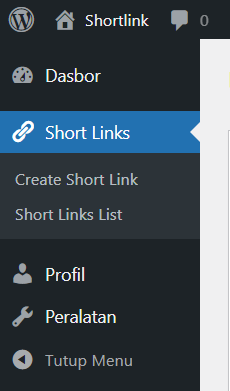
- Find and click the menu Short Links.
- Below that, click the submenu Create Short Link (or Create Short Link) to open the form.
2. Create a New Short Link
Use this form to turn a long link into a short, easy-to-remember link.
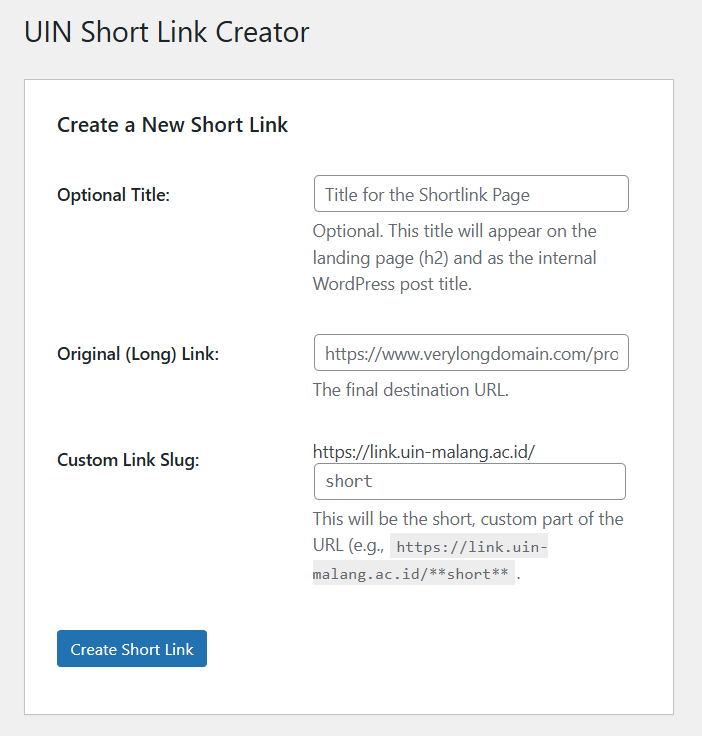
| Form Fields | Description & Example of Use |
|---|---|
| Optional Title (Optional Title) | (Optional) This title will be the internal name in the dashboard and will be displayed as the title (H2) on the link redirect page. Example: Quick Access to Prospective Lecturer Registration |
| Original (Long) Link) (Original/Long Link) | (Must) Enter your complete destination URL. Example: https://ujicoba.uin-malang.ac.id/app/dashboards#... |
| Custom Link Slug (Link Keyword) | (Must) Enter your desired short keyword. This will be the last part of your URL. Example: If you enter performance, your short link will be link.uin-malang.ac.id/prestasi. |
After filling in all three fields (or two fields if Title is left blank), click the button Create Short Link.
3. Success Page and Using Links
Once the link is successfully created, you will see a success message along with a short link that you can use immediately.
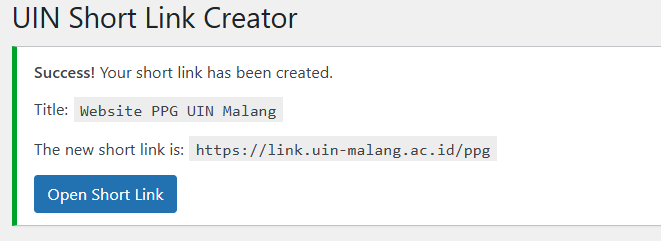
- Your link: Copy the new link (eg.
https://link.uin-malang.ac.id/kibana) to use wherever you need. - Knob: Click the button Open Short Link to immediately test your newly created link in a new tab.
4. Automatic Redirect Mechanism
When visitors click on the short link you created, they will be taken to an intermediate page for 5 seconds:
- Display Page: Visitors view the page with Optional Title that you provide (or the default title if left blank).
- Countdown: A countdown will appear from 5 seconds (
Redirecting in 5...). - Automatic Redirection: Once the count reaches 0, the visitor will automatically redirected to Original (Long) Link) that you specify.
- Manual Action: Visitors can also click the button Click Here to Continue Now to skip the countdown and immediately be redirected.
5. View and Manage Link List
To see all the links you have ever created, you can access the submenu Short Links List (or Short Link List).
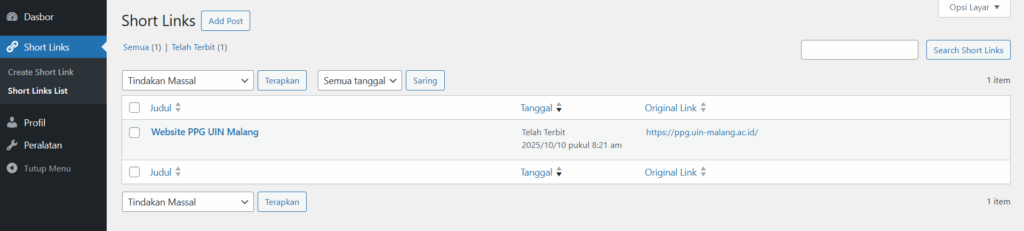
- On this page, you can edit the title, keywords, or original link of an existing Short Link, as well as delete it if it is no longer used.
Important: Procedure for Submitting Short Link Access Rights
Access to use this Short Link feature is granted to sub-units at UIN Malang. If you don't yet have this access, or if you're having difficulty creating, editing, or deleting Short Links through this dashboard, you can submit a formal request through our service complaint system:
- Submit your Author Role application or your problem through DUMAS UIN Malang: dumas.uin-malang.ac.id